
Propel PLM implementation connects product information, processes, systems, and people. This guide explains the delivery paths, business decisions, responsibilities, data controls, integrations, testing, training, go-live preparation, and ongoing ownership required to turn the platform into a working operating environment.
Propel can be deployed faster than traditional on-premises PLM platforms. Companies do not need to purchase servers, build infrastructure, or prepare for conventional software upgrades.
That removes much of the technical weight. It does not remove the decisions.
Before users can manage product records, bills of materials, documents, changes, suppliers, and quality processes in Propel, the organization must determine how those processes should work. Existing data must be evaluated. Integrations need defined ownership. Users must understand what changes and what remains the same.
The platform may be ready before the business is.
A successful Propel PLM implementation closes that gap. By the end of this guide, readers should be able to identify the appropriate implementation path, the decisions their organization must own, the resources it must provide, and the evidence required before go-live.
What Is a Propel PLM Implementation?
A Propel PLM implementation converts business requirements into a working product lifecycle management environment. It applies the broader disciplines covered by Domain’s PLM implementation services to Propel’s Salesforce-native architecture, configuration model, data structures, and shared product record.
Propel describes this foundation as a unified product thread, where PLM, QMS, and PIM capabilities can connect engineering, quality, supply chain, sales, marketing, and service on the same platform. The implementation should include only the licensed capabilities, teams, data, and workflows approved for the first release. When AI-enabled workflows are included, data quality, permissions, validation, and process ownership remain implementation requirements.
The work normally includes:
- Defining project scope and measurable business outcomes
- Selecting the appropriate delivery model
- Designing future processes and product-data structures
- Configuring workflows, roles, permissions, and reporting
- Migrating data and connecting enterprise systems
- Testing the complete operating process
- Producing validation evidence when required
- Training users and planning the transition to support
- Establishing post-launch ownership and release management
Configuration is part of the implementation, but it is only one workstream.
Think of the platform as a well-equipped workshop. The tools may already be present, but the organization must still decide what it will build, where materials belong, who can use each tool, and how finished work will move to the next station.
Why Propel’s Architecture Changes the Implementation
Propel is built natively on Salesforce. Customers do not need to be existing Salesforce users or purchase separate Salesforce licenses because Propel is deployed using an embedded OEM license.
The Salesforce foundation provides Propel with:
- Cloud infrastructure
- Authentication and access controls
- Low-code and no-code configuration
- Workflow and reporting capabilities
- APIs and integration options
- Automatic platform updates
- Mobile access
- Access to the Salesforce application ecosystem
This architecture reduces the infrastructure and custom-development burden associated with many legacy PLM implementations. It also gives implementation teams considerable flexibility.
Flexibility creates its own requirement: governance.
If every request becomes a new field, workflow, notification, or automation, the system can accumulate complexity before users ever log in. Configuration should follow agreed business requirements, not replace the process of establishing them.
Organizations should also define how platform releases will be assessed after go-live. Vendor-managed updates reduce infrastructure work, but the Propel owner still needs a process for reviewing release impacts, testing affected configurations and integrations, communicating changes, and confirming production readiness.
For more information, see Propel’s explanation of its Salesforce-native architecture.
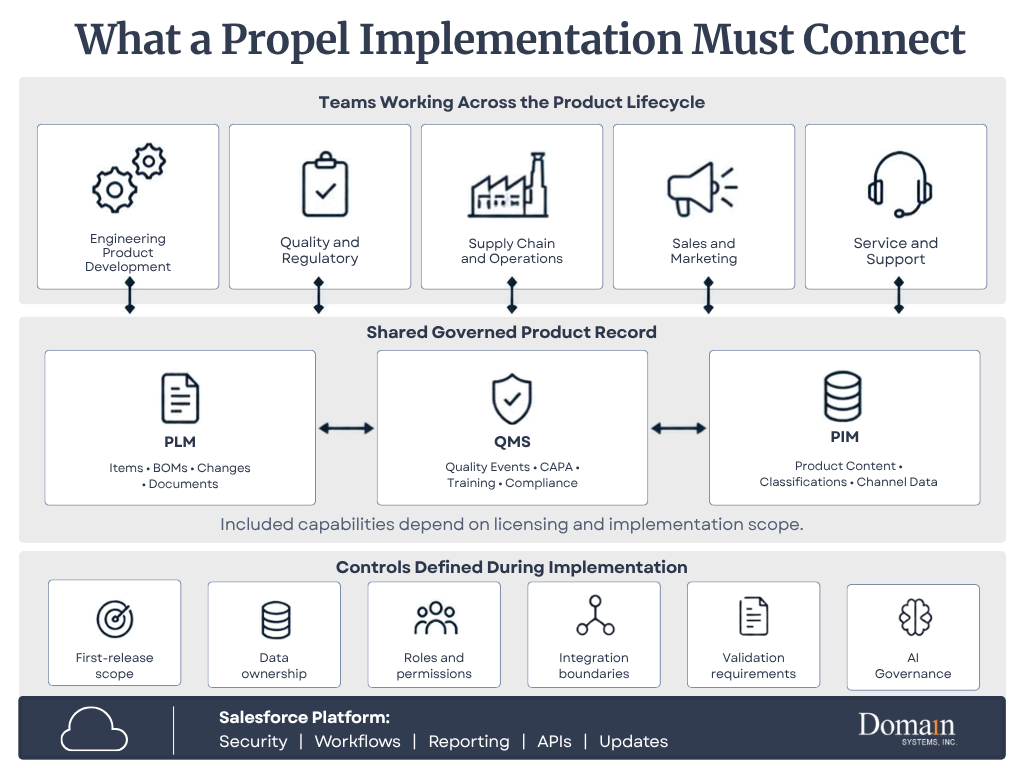
Download this infographic: What a Propel Implementation Must Connect (PDF)
Choose the Right Propel Implementation Path
A four-week implementation is a focused starting point, not a universal description of every Propel project. The correct path depends on scope, customer responsibilities, data, integrations, validation requirements, and planned extensions.
| Approach | Best fit | Initial delivery | Common extensions |
| Domain Systems Propel FastStart | Small and midsize manufacturers that can operate within standard workflows and provide a small, accountable project team | Four-week activation of core item and BOM management, change management, AMLs, lifecycle states, numbering, and categorization using standard Propel-supported configuration | Data migration, integrations, Quality, advanced configuration or workflow refinement, and ongoing support |
| Standard implementation | Organizations introducing several processes, meaningful migration, or one or more integrations | Broader design, iterative configuration, data preparation, testing, training, and cutover | Additional sites, supplier access, QMS, PIM, or phased integrations |
| Enterprise program | Multiple business units, regulated processes, complex product structures, or connected PLM and QMS | Coordinated program with governance, migration, integration, validation, change management, and phased deployment | Regional rollouts, additional product lines, analytics, supplier collaboration, and managed services |
Domain Systems’ FastStart is a four-week implementation service that establishes a production-ready core PLM baseline using standard Propel-supported configuration. The service includes Salesforce org provisioning, role-based access, standard collaboration features, and setup for up to 20 internal users.
FastStart intentionally excludes data migration, customization, and Propel QMS from its core scope. Organizations that require those capabilities, broader integrations, multiple business units, formal validation, or nonstandard process design should plan a broader implementation or phase those needs after the initial launch.
How long does a broader Propel implementation take?
Outside the defined FastStart scope, implementation duration should be established after discovery. Process scope, data condition, integrations, validation requirements, internal resource availability, and decision speed can all affect the schedule.
The following are planning ranges rather than delivery commitments:
| Implementation path | General planning range | Typical characteristics |
| Domain Propel FastStart | Four weeks | Core item and BOM management, change control, AMLs, lifecycle configuration, permissions, and up to 20 internal users |
| Standard implementation | Approximately three to six months | Multiple processes, data migration, integrations, testing, training, and broader configuration |
| Enterprise or regulated program | Established after discovery | Multiple business units, formal validation, PLM with QMS or PIM, complex integrations, or phased deployment |
These are planning ranges rather than delivery commitments. Project readiness, resource availability, data quality, and decision speed can move an implementation in either direction.
Domain Systems’ Propel services include implementation, Agile-to-Propel migration, regulated-environment delivery, application support, and post-go-live services. ProNova Solutions’ migration illustrates how these workstreams can converge within one engagement.
“A seamless PLM transition. Domain Systems led the full migration from Agile to Propel including data, configuration, and project coordination. End-to-end ownership kept the transition controlled and predictable.”
—Amy Bellendir, Sr. Business Analyst, ProNova Solutions
Who Owns What During the Implementation?
Implementation work is shared, but accountability should not disappear into a general “project team.” The exact assignments belong in the statement of work, but a typical ownership pattern looks like this:
| Workstream | Customer responsibility | Domain Systems responsibility | Propel Involvement (when included in engagement) |
| Outcomes and scope | Own business priorities, constraints, and approvals | Facilitate decisions, document scope, and identify delivery risks | Clarify product capabilities and licensed scope as needed |
| Process and configuration | Provide process owners and approve the future state | Translate requirements into Propel design and configuration | Provide product guidance or services defined in the engagement |
| Data migration | Own source data, retention requirements, and business acceptance | Assess, map, transform, load, validate, and reconcile approved data | Support product-specific questions and platform access as contracted |
| Integrations | Identify systems, owners, security requirements, and operating needs | Design and deliver interfaces included in scope | Provide platform framework, product capabilities, and partner options |
| Testing and validation | Supply scenarios, testers, approvals, and compliance ownership | Build test strategy, support execution, manage defects, and produce agreed evidence | Address product issues and contracted validation support |
| Training and adoption | Provide users, managers, communications, and attendance | Develop role-based training and practical exercises | Supply product resources or contracted administrator training |
| Go-live and support | Approve readiness and own the operating decision | Coordinate cutover, stabilization, and support transition | Provide software support and services defined by contract |
This division matters because software cannot approve the future business process, define the regulatory record-retention requirement, or decide which data the company is willing to leave behind. Those decisions remain with the customer, even when an implementation partner prepares the analysis.
The Four Stages of Propel PLM Implementation
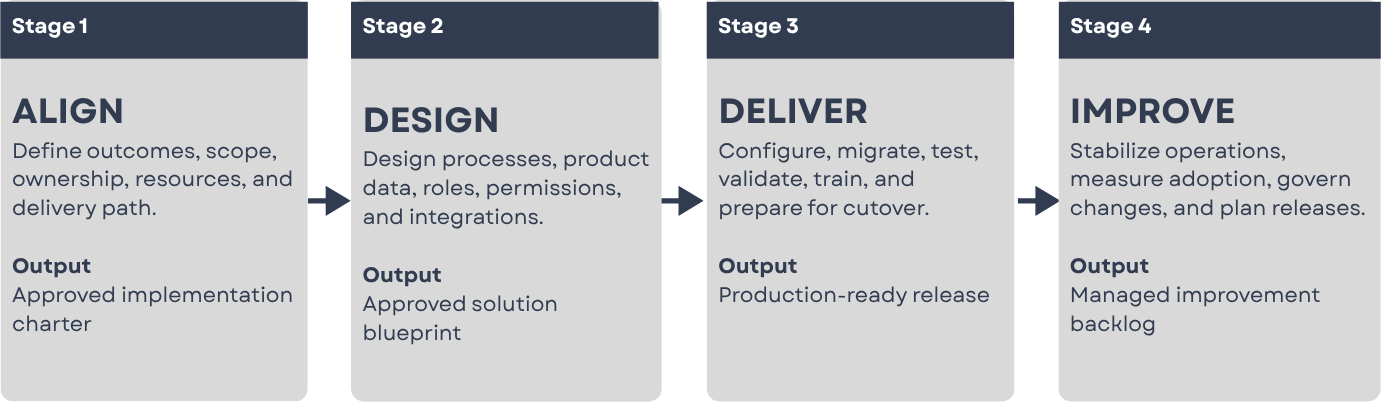
For this guide, implementation is grouped into four connected stages:
- ALIGN
- DESIGN
- DELIVER
- IMPROVE
The stages provide decision gates, not walls. Project management, data, integration, testing, validation, training, and change management continue across more than one stage.
Stage 1: ALIGN
Establish what the implementation must accomplish
“Implement Propel” is not a business outcome. It is a project description.
More useful objectives include:
- Reduce engineering-change approval time
- Replace uncontrolled spreadsheets and shared drives
- Establish one approved product record
- Improve BOM accuracy
- Connect engineering and manufacturing changes
- Link product and quality information
- Improve traceability for audits
Whenever possible, record the current baseline and the expected result. “Improve change management” provides direction. “Reduce median change approval time from 14 days to seven days within six months of go-live” provides a target.
Clear outcomes create boundaries. They also give the team a way to evaluate results after launch.
Define the first-release scope
A Propel implementation does not need to include every possible process in its first release. Initial scope may include items, BOMs, documents, engineering changes, manufacturer and supplier information, product requirements, or new product introduction.
Quality processes, supplier collaboration, product information management, advanced integrations, and additional business units can be introduced at the same time or phased into later releases.
The right answer is not always the largest first release. It is the smallest release that produces a complete and useful operating process.
Establish governance and resource commitments
Every implementation needs clear decision rights.
The governance model should define:
- Who owns the business outcome
- Who approves process decisions
- Who controls scope
- Who resolves cross-functional disagreements
- Who approves migrated data
- Who accepts the system for production use
- Who owns Propel after go-live
The customer should also reserve time for process workshops, data decisions, demonstrations, test execution, training, and cutover. An implementation partner can carry delivery work, but it cannot replace the people who understand why the business operates as it does.
Without this structure, unresolved decisions collect in the implementation backlog. Configuration continues around them until testing exposes the gaps.
Stage 2: DESIGN
Design the future process before configuring it
Implementation teams commonly begin by documenting the current process. That is necessary, but the current process should not automatically become the future process.
Legacy workflows often contain steps created to compensate for software limitations, missing integrations, historical findings, informal ownership, or old custom code. Rebuilding every workaround in Propel may reproduce the limitations the organization intended to leave behind.
For each process, ask:
- What decision is being made?
- What information is needed to make it?
- Who is accountable?
- Which approvals are required?
- What evidence must be retained?
- Which steps exist only because of the previous system?
The goal is not to make the process look modern. It is to make ownership and information flow clear.
Design the Propel product-data model
The product-data model establishes how information will be organized and related in Propel.
Typical decisions include:
- Item and document categories
- Numbering conventions
- Lifecycle phases and release states
- Revision rules
- Attributes, permitted values, and BOM structures
- Manufacturer, supplier, and quality relationships
- Change types and approval rules
- User, group, and supplier access
These decisions have downstream consequences. A field that appears minor during configuration may later influence reports, integrations, approval rules, migration mapping, or regulatory evidence.
Attribute definitions should include business meaning, owner, permitted values, required conditions, source system, reporting and integration use, and correction rules. A label alone is not a definition.
Define roles, permissions, and environments
Roles should be based on responsibilities rather than job titles alone.
Two engineers with the same title may require different access because one creates records while the other approves them. The design should identify who can create, submit, approve, release, administer, view sensitive information, collaborate with suppliers, and correct data after release.
The environment strategy should also identify where configuration, testing, validation, training, and production activity will occur. Teams should confirm the deployment path between environments, refresh expectations, test-data rules, and who has authority to promote changes.
Permissions added late can disrupt workflows and testing. They should be treated as part of process design.
Create the integration blueprint
Most manufacturers operate Propel within an environment that may include ERP, CAD or PDM, CRM, MES, supplier, identity, and reporting systems.
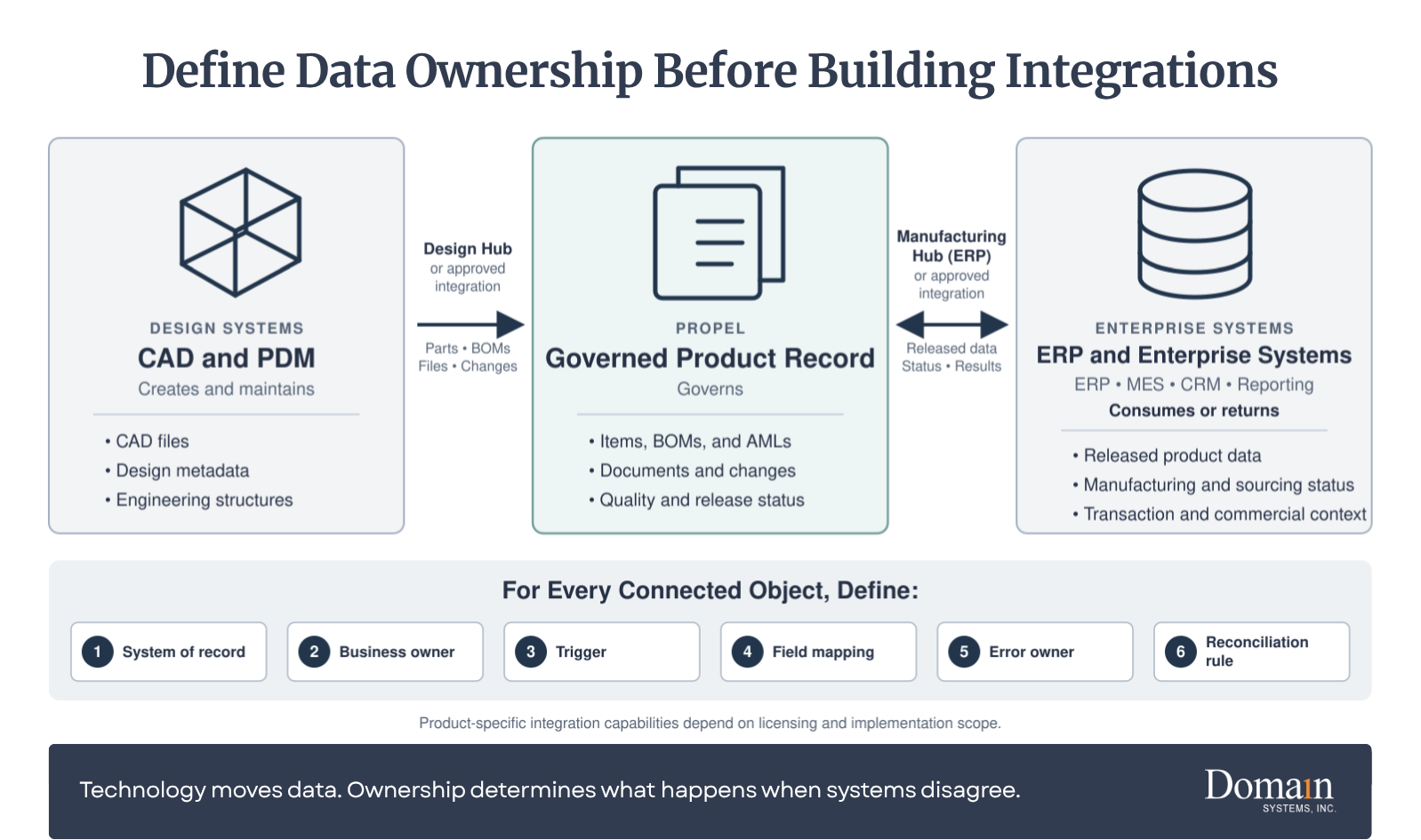
Before building an integration, define where each data object is created, where it is governed, which systems consume it, how changes move, and who corrects failed transactions.
| Information | Common governance location | Common consumer | Design question |
| Engineering item and revision | Propel | ERP, CAD/PDM, reporting | What release event authorizes distribution? |
| Production inventory and financial cost | ERP | Propel or analytics where needed | Which values return to Propel, and how often? |
| Native CAD file and rendition | CAD/PDM or governed Design Hub flow | Propel product record | Which files, structures, and revisions move? |
| Released engineering BOM | Propel | ERP and manufacturing systems | How is EBOM ownership separated from MBOM ownership? |
| Customer case or complaint | CRM or QMS, based on process | Propel PLM/QMS when product impact exists | Which events create a closed-loop quality action? |
| Approved manufacturer and supplier data | Propel or ERP, based on governance | Sourcing, ERP, and reporting | Who corrects conflicting supplier information? |
Technology connects the systems. Ownership prevents them from arguing.
Propel provides a flexible API framework and supports integrations through custom solutions and iPaaS partners such as MuleSoft and Jitterbit. See Propel’s current enterprise integration options.
Organizations should also evaluate Propel’s product-specific integration paths. When licensed and included in the implementation scope, Design Hub governs the movement of CAD, PDM, parts, BOMs, files, and related design information into the Propel product record. Manufacturing Hub supports governed PLM-to-ERP transactions, including field mapping, transformation logic, status write-back, and transaction logging.
The right design depends on the customer’s applications, licensed capabilities, data model, event volume, compliance needs, and error-recovery process.
Stage 3: DELIVER
Configure and demonstrate the approved design
Once the initial design baseline is approved, the configuration team can translate it into Propel.
Configuration may include categories, attributes, lifecycles, workflows, approvals, notifications, page layouts, reports, roles, permissions, automation, and integration endpoints.
Configuration should be demonstrated throughout the project rather than revealed at the end. Short review cycles allow process owners to confirm whether the system reflects what they approved and make misunderstandings less expensive to correct.
New requirements will still emerge. The project should distinguish clarifications, defects, and approved scope changes so iterative delivery does not become uncontrolled expansion.
“Domain’s depth of experience across companies of varying sizes and implementations was evident throughout our configuration. I was able to explore different scenarios, understand the reasoning behind configuration decisions, and go live with confidence in a system tailored to our processes.”
-Jack Poon, Sr. Design Systems and Tools Engineer, Inspiren
Prepare and migrate data through controlled cycles
Data migration is not a file-transfer exercise. It is the controlled movement of product information and relationships from one structure to another.
Depending on the source, migration may include items, documents, revisions, BOMs, manufacturer and supplier information, changes, quality records, attachments, and historical relationships. Users and groups should be handled through the approved identity, provisioning, and security design rather than assumed to be ordinary product-data records.
A structured migration generally follows this progression:
Assess -> Extract -> Cleanse -> Map -> Load -> Validate -> Reconcile
The migration plan should define:
- Which records remain operational, historical, or regulatory
- Which records will be archived or excluded
- Field mappings, transformations, default values, and exceptions
- Trial-load schedule and correction cycles
- Record, relationship, revision, and attachment reconciliation
- Error disposition, acceptance, final-load, and archive criteria
Moving everything may appear safer, but it increases mapping, validation, storage, and support requirements. Data should be moved because it has an operational, historical, or regulatory purpose, not simply because it exists.
For an Agile-specific treatment, see Before You Migrate from Agile PLM to Propel PLM: 5 Questions Every Team Should Ask and The Agile-to-Propel Migration Process. For a phase-by-phase reference covering roles, timelines, ETL, failure points, and post-go-live accountability, download Domain’s Agile-to-Propel Migration Guide.
Test the system in layers
Testing should answer different questions and produce different evidence.
| Test activity | Primary question | Typical evidence |
| Configuration review | Did the configuration match the approved design? | Demonstration record, review notes, approved decisions |
| Functional or unit testing | Does the individual function behave as intended? | Test result and defect record |
| Integration testing | Do connected systems exchange the correct data and recover from failure? | Payload, transaction result, error and retry evidence |
| Migration validation | Did the correct records, revisions, files, and relationships move? | Counts, reconciliation, sampling, and exception approval |
| Conference room pilot | Does the complete process work across functions? | End-to-end scenario results and design feedback |
| User acceptance testing | Can users perform approved business scenarios? | Executed scripts, defects, and business approval |
| Cutover rehearsal | Can the team execute the transition within the planned window? | Timed runbook, dependencies, issues, and revised plan |
User acceptance testing should not be the first time process owners see the system. At that point, the project should be confirming readiness, not discovering what the organization intended to build.
For more detail, see Conference Room Pilot vs. UAT in PLM.
Treat regulated validation as a lifecycle
For a regulated implementation, validation is not one final test after UAT. It is a controlled lifecycle that connects intended use, risk, requirements, configuration, testing, deviations, traceability, and approval.
The validation approach may include:
- Intended-use and risk assessment
- Approved requirements, specifications, and traceability
- Controlled test protocols and objective evidence
- Deviation, defect, and retest management
- Migration, integration, and electronic-record evidence as applicable
- Formal approval for production use
The organization’s quality or validation lead remains accountable for the compliance approach, even when Domain prepares agreed documentation or supports execution.
Train people for their responsibilities
Training should be organized by role.
An occasional approver does not need the same training as an administrator. A quality investigator needs different scenarios than a design engineer. Suppliers should see only the processes and information relevant to their participation.
A role-based plan may cover administrators, process owners, record creators, approvers, quality and reporting users, suppliers, and support personnel.
Training should use realistic data and scenarios whenever possible. Attendance confirms that someone entered the room. It does not confirm that the person can complete the work.
The most useful training requires users to perform the tasks they will own after launch.
Plan the Propel go-live
Go-live is a controlled operational transition.
The cutover plan should define final configuration approval, legacy-system freeze, final data extraction, delta migration, data reconciliation, integration activation, user provisioning, production validation, support coverage, escalation procedures, rollback criteria, and communication responsibilities.
The project team should also define what “ready” means. Examples include:
- Critical workflows passed testing
- Required data reconciled and approved
- High-risk defects resolved or formally accepted
- Integrations operating within agreed tolerances
- Administrators and users trained by role
- Business owners approved deployment
- Cutover rehearsal completed
- Support responsibilities assigned
A date is not a readiness criterion.
Stage 4: IMPROVE
Implementation does not end when users receive access.
The first weeks after launch reveal how the design performs under real workload. Questions increase. Reports require adjustment. Some notifications prove unnecessary. New improvement requests appear as users gain experience.
The organization should begin go-live with:
- A named Propel owner
- Defined support channels and escalation paths
- Issue classification and prioritization rules
- Daily or weekly stabilization reviews
- Integration and transaction monitoring
- A controlled configuration-change process
- An enhancement backlog
- Adoption and performance measures
- Release-impact and regression responsibilities
Not every request should become an immediate configuration change.
A stabilization period allows the team to separate defects from training questions, missing requirements, and individual preferences. Without that discipline, the environment can change faster than users can learn it.
After stabilization, ownership moves into a steady operating rhythm. Domain Systems provides Propel application support for organizations that need structured access to experienced practitioners for issue resolution, planned assistance, and informed guidance around change.
Common Propel PLM Implementation Mistakes
Treating starter scope as the final enterprise design
A rapid baseline can create value quickly, but it should be accompanied by a roadmap for migration, integrations, validation, and later processes.
Recreating the legacy system
A new platform should preserve necessary controls, not every historical workaround.
Starting configuration before the design baseline is approved
Early configuration can look like progress while unresolved requirements accumulate underneath it.
Migrating all available data
Data should be moved because it has an operational, historical, or regulatory purpose, not simply because it exists.
Designing integrations without assigning ownership
Every connected data object needs an agreed creation point, governance owner, distribution rule, and correction process.
Waiting until UAT to involve users
Late feedback usually becomes expensive feedback.
Treating validation as final-stage documentation
Regulated evidence should be planned from intended use and requirements through production approval.
Treating training as a single event
Adoption requires role-based practice, support, reinforcement, and accountable process owners.
Ending governance at go-live
Without post-launch ownership, configuration and data quality gradually drift.
How Should Implementation Success Be Measured?
Project completion measures tell you whether the implementation launched. Operational measures tell you whether it worked.
| Area | Possible measure |
| Adoption | Active users and successful task completion |
| Change management | Change-cycle and approval time |
| Data quality | Required-field completion and duplicate rates |
| BOM management | BOM errors and reconciliation exceptions |
| Integration | Failed transactions, retry rate, and correction time |
| Training | Task proficiency and repeat support requests |
| Support | Issue volume, severity, and resolution time |
| Governance | Enhancement backlog, approval time, and configuration drift |
| Business results | Rework, delays, audit findings, or release performance |
Baseline measurements should be recorded before implementation when possible. Without a starting point, improvement becomes difficult to prove.
Propel PLM Implementation Checklist
Before implementation begins, confirm that the organization has:
- Defined measurable business outcomes and baseline measures
- Selected the delivery path and first-release scope
- Distinguished contracted starter scope from planned extensions
- Named an executive sponsor and business owner
- Identified process owners and decision-makers
- Reserved internal resources for reviews and testing
- Documented critical requirements and compliance needs
- Inventoried product data, revisions, files, and relationships
- Identified data owners, retention rules, and archive needs
- Listed current integrations and assigned systems of record
- Defined security, access, identity, and environment requirements
- Established migration reconciliation and acceptance criteria
- Defined the testing and validation approach
- Established scope-control procedures
- Planned role-based training and adoption support
- Defined cutover, rollback, and stabilization responsibilities
- Assigned post-go-live ownership and release management
A “no” does not necessarily mean the project must stop. It means the associated risk should be visible, assigned, and managed.
FAQ
How long does a Propel PLM implementation take?
A focused Domain Propel FastStart implementation can establish a production baseline in four weeks when the organization remains within the defined scope and provides timely decisions and resources. A standard implementation commonly requires approximately three to six months. Enterprise and regulated programs should be estimated after discovery because data migration, integrations, validation, multiple business units, and expanded Propel QMS or PIM scope can materially change the schedule.
What is included in Domain Systems' FastStart?
Domain’s Propel FastStart is a four-week implementation service delivered by Domain Systems for organizations that can use standard Propel-supported configuration. It covers core item and BOM management, change management, AMLs, lifecycle states, numbering and categorization, Salesforce org provisioning, role-based permissions, standard collaboration, and setup for up to 20 internal users. Data migration, customization, and Propel QMS are excluded from the core scope. Integrations, advanced configuration, migration, and ongoing support can be evaluated separately.
Do we need Salesforce before implementing Propel?
No. Propel states that customers do not need to be existing Salesforce users or purchase separate Salesforce licenses. Propel is deployed with an embedded Salesforce OEM license.
Can Propel support both PLM and QMS?
Yes. Propel provides connected PLM and QMS capabilities on the same platform. Whether they should be implemented together depends on process maturity, available resources, regulatory requirements, and project scope.
What determines Propel implementation cost and effort?
The primary drivers are process scope, data volume and quality, migration history, number and complexity of integrations, validation requirements, user population, training needs, number of business units, and the amount of nonstandard configuration.
How much time must our internal team provide?
The exact commitment depends on scope, but the customer must provide decision-makers, process and data owners, subject-matter experts, testers, administrators, and business approvers. Delayed access to those resources commonly delays configuration, testing, and go-live decisions.
How many migration test loads should we expect?
The number depends on data condition and complexity. The plan should include enough trial loads to correct mappings, transformations, relationships, files, and exceptions before the final cutover load. Business owners should approve the reconciliation criteria and results.
What changes for a regulated Propel implementation?
Validation planning begins with intended use, risk, requirements, and traceability. The project must control configuration, test evidence, deviations, migration results, electronic records and signatures where applicable, and formal approval for production use.
Build the Operating Model Before the System
Propel’s architecture can shorten deployment and reduce the technical burden associated with traditional PLM platforms.
The implementation still depends on decisions about process, data, integration, ownership, testing, validation, and adoption.
Those decisions are not delays to the implementation. They are the implementation.
Domain Systems helps manufacturers plan, configure, migrate, integrate, validate, train, launch, and support Propel environments. An implementation readiness review provides a practical view of first-release scope, delivery-path fit, internal resource needs, data and integration risks, ownership gaps, and the decisions required before configuration begins.